ATS-friendly CV: how applicant tracking software reads your CV.
Here is how an ATS reads your CV, and what matters for layout, file format and keywords. Upload your CV and we tailor it to the job ad.
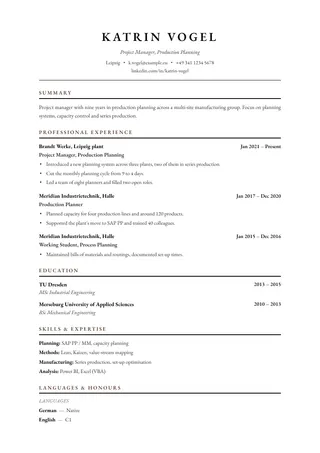
An ATS-friendly CV is one that applicant tracking software can read without errors: clearly structured, saved as real text, and using the job ad's own terms.
- Standard headings
- Real text in the PDF
- The ad's own terms
What an ATS is and how it reads your CV.
ATS stands for applicant tracking system. Employers use it to collect every application, pass them on to the hiring team and keep track of where each one stands. The online portal you apply through is usually the front door of such a system.
When you upload your CV, a parser splits it into fields: name and contact details, roles with title and dates, education, skills. Roche's careers FAQ describes this CV parsing as the automatic extraction, storage and analysis of CV data. After that, applications can be sorted and searched by keyword.
Many portals also use the parsed text to pre-fill the application form. Germany's Federal Employment Agency describes these portals as forms where you enter your personal details and career history and upload documents. Anything the parser gets wrong, you correct there by hand, and Roche explicitly asks applicants to check the fields it has filled in.
What makes a CV readable for an ATS.
There is no single ATS standard, and every system reads a little differently. The rules that hold everywhere are about being unambiguous: the parser has to see where a section starts, which line is a job title and which dates belong to which role.
One column for the reading flow
Tables, text boxes and multiple columns are among the most common sources of errors. Roche points out that columns may be read side by side instead of top to bottom, which mixes lines from two sections into one.
Standard headings
Every system recognises “Work experience”, “Education”, “Skills” and “Languages”. A creative heading such as “My journey” may not map to any field, and the roles under it then go missing from your profile.
Contact details on the page itself
Your name, phone number and email address belong in the body of the page. Roche notes that headers and footers are sometimes dropped entirely when a CV is parsed.
PDF or Word, with real text
Roche recommends .docx or PDF: an ATS reads a Word file most accurately, while a PDF keeps your layout best. What matters is real text. A scanned CV, or one exported as an image, contains no words the software can read, which is why the University of Hohenheim lists exporting a CV as a graphic among its no-gos.
Consistent dates
Every role needs a start and an end in the same format, such as “03/2021 – 08/2024” or “Mar 2021 – Aug 2024”. Mixed formats make it harder for the software to match dates to the right role.
Plain fonts, meaning without colour
Roche names standard fonts such as Arial, Helvetica, Georgia or Cambria and notes that an ATS outputs everything in one colour. Anything that stands out only through colour is lost. Bold, italics and ordinary bullet points are fine.
A quick test for your own PDF: select all the text and paste it into a blank text document. If everything arrives complete and in the order you would read it, that is a good sign. If lines are missing or sections are jumbled, a parser probably sees the same jumble.
Keywords from the job ad.
Recruiters search their ATS for terms, usually the ones in their own ad: a piece of software, a qualification, a job title. Use those terms word for word where they describe what you did. If the ad asks for “accounts receivable”, “accounting” is too general.
Put each term where you can back it up, in the role where you actually worked that way. Roche advises naming the hard skills from the ad in context, so the reader can see how you used them. Watch the spelling too, because a search finds what is written exactly that way.
Your job titles stay as they were, translated only when your German CV goes into English, and then at the same level. Recruiters search for job titles as well, and a title you never held shows up as soon as someone reads your references.
What an ATS actually does.
The ATS sorts, a person decides.
An ATS orders, searches and routes applications. Roche states in its FAQ that recruiters review every application and every CV. A cleanly parsed CV makes sure they see all of it.
A PDF is readable when it contains real text.
A PDF exported from Word or a CV editor contains text a parser can read. A scan or a photo of your CV contains only pixels.
Design and readability go together.
An accent colour, a rule or a distinctive font for your name does not get in the way, as long as the text is stored as text and the sections are unambiguous. Text boxes, tables and content that exists only as an image are where problems start.
An online check tests what holds for every system.
Every ATS check, ours included, tests general properties such as structure, completeness and dates. How a particular employer's system reads your CV shows in its own portal, once the form displays the fields it has parsed.
How Resume Copilot's layouts are built.
Real text in every PDF
Every layout exports as a PDF with selectable text. An automated test exports each layout and checks that every page actually contains text.
Fixed, standard headings
The sections are called Profile, Work experience, Education, Skills, Languages, Certifications and Projects. You can add sections of your own and name them yourself.
Contact details as text on the page
Your name, phone number, email address and links sit as text on the first page itself. Links stay clickable in the PDF.
One date format for every role
Every entry shows its dates in the same format, month and year by default. After each tailoring run, a validator checks that the dates are still consistent.
Every line is ordinary text
The layouts arrange columns and dates with the page grid. They contain no tables and no text boxes.
One column when you want to play safe
Most layouts run your CV in a single column from top to bottom. Banker and Sidebar add a second column alongside. For a portal that parses your CV, Classic and Modern are the safe choice, and you switch layouts with one click.
Check your CV before you send it.
The free CV check tests what an ATS has to read: contact details, dates, gaps in your timeline and numbers in your bullet points. You get a score and a list of specific findings, without an account.
Check my CV for freeSee all CV templates →Frequently asked questions about ATS-friendly CVs.
What is an ATS-friendly CV?
An ATS-friendly CV is one that applicant tracking software can transfer into its fields without errors. It is clearly structured, uses standard headings, is stored as real text and contains the job ad's terms where your experience backs them up.
Can an ATS read a PDF?
Yes, as long as the PDF contains real text. Roche's careers FAQ recommends .docx or PDF and calls PDF the format that keeps your layout best. A scan, or a CV saved as an image, contains no text a parser can read. If a portal explicitly asks for a Word file, send one.
Are two-column CVs ATS-friendly?
It depends on the system. Some parsers read columns side by side instead of one after the other, as Roche also points out. If you apply through a portal that parses your CV, a single-column layout is the safe choice. If your application goes by email to a person, a sidebar is fine.
Can an ATS-friendly CV have a photo?
Yes. A photo is customary in Germany, although the Federal Employment Agency says it is no longer a must. What matters is that your name and contact details sit as text next to the photo. If a portal asks for the photo separately, upload it there.
Which headings does an ATS recognise?
An ATS recognises the standard headings: Work experience, Education, Skills, Languages and Certifications, plus a Profile or Summary. Roche advises conventional headings because a system cannot always map unusual ones. In Resume Copilot's layouts, these headings are fixed.
How do I find the right keywords?
Read the job ad and mark the terms that come up more than once or sit under the requirements: software, methods, qualifications, technical terms. Take the ones your experience genuinely backs up and use them word for word in the matching role. Resume Copilot does exactly that when it tailors your CV, and only uses a term where your CV covers it.
Does an ATS reject applications automatically?
Each employer decides that for itself. Some forms ask mandatory questions, about a work permit or a qualification for instance, and filter on the answers. The CV itself is read by people in the end, and they find it through the terms they search the system for.
How do I check whether my CV is ATS-friendly?
Do the copy test from the section above: paste the text from your PDF into a blank document and see whether everything arrives complete and in the right order. Resume Copilot's free CV check tests structure and completeness.
Are Resume Copilot's templates ATS-friendly?
They are built for it. Every layout exports a PDF with real text, the headings are fixed, contact details sit as text on the page, and every role shows its dates in the same format. For portals that parse your CV, the single-column Classic and Modern layouts are the safest choice.
What do the check and the tailoring cost?
The CV check is free and needs no account. For tailoring, your first three applications are free, the first without an account. After that you buy one-off credit packs, no subscription; prices are on the pricing page.
A CV that software and people both read well.
Upload your CV, paste the job ad, and see the tailored version before you sign up for anything.
Tailor it free now